Table of Contents
What Is a Gacha Life Music Video?
A Gacha Life Music Video is a fan-created animation-style video that uses characters designed in the mobile game Gacha Life (by Lunime) to visually narrate a song. These videos typically feature lip-syncing characters, emotional storylines, choreographed scenes, and edited visual effects. They are often uploaded to YouTube and TikTok, where the Gacha community has grown into a massive global phenomenon.
If you are new to this universe, you might want to first check out What Is A Gacha Game for a broader foundation, but let’s get straight into the melodic heart of Gacha.
Unlike typical gameplay videos, a Gacha Life Music Video is more like an animated mini-movie set to music. Creators use the game's dress-up and scene tools to build sets, characters, and dialogues, then take screenshots or record footage, and edit it all together with the song of choice using external video editing software. The results can be stunningly professional, blending pop culture, original storytelling, and anime-inspired visuals.
💡 Key Insight: The best Gacha life music videos are not just a slideshow of pretty characters. They tell a story that resonates — love, loss, friendship, rebellion — you name it. This emotional hook often makes a video go viral.
The term “music video” in the Gacha universe has evolved to include everything from lyrical “character intros” to full-on musical episodes with voice acting. Some of the most popular creators have millions of subscribers, earning their craft the recognition of a unique new media form. For users who play the game online, Now Gg Gacha Life offers a browser-based way to get started without installs.
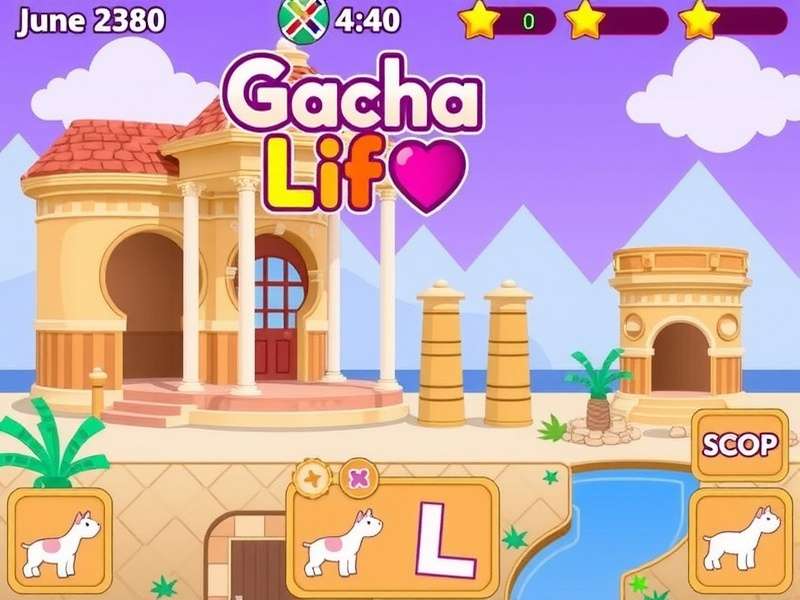
🎨 A typical Gacha Life music video scene blends vibrant anime-style characters with emotional storytelling.
The History & Evolution of Gacha Life Music Videos
2.1 Origins of Gacha Life
The original Gacha Life game was released in October 2018 by Lunime. It was designed as a casual dress-up and social sim, aimed primarily at younger audiences who loved anime aesthetics. Very quickly, the community realized that the game’s studio mode allowed for complex scene creation, which bold creatives began using to produce short stories.
From static photo stories, it was only a small jump to animated music videos. The first wave of Gacha Life Music Videos appeared on YouTube around 2019, using songs like “Scary Stories” and “50/50”. These early videos were simple — a character moving to a track with basic facial expression swaps — but the creative potential was obvious.
2.2 The Explosion of the Genre
By 2020, the Gacha music video scene became a cultural force. Dedicated channels like “xxx” and “Kookies” achieved millions of views, showcasing high-effort edits, cinematic transitions, and original soundtracks. The term Gacha Meaning became a search staple, as fans wanted to understand the nuances behind these creative expressions.
This era also gave rise to subgenres:
- 💜 Dance videos — characters groove to popular choreographies.
- 🎭 Story-driven videos — narrative arcs with twists and endings.
- ⚔️ Battle scenarios — see Gacha Life Reacts To Death Battle for crossover examples.
- 🎤 Cover videos — original covers of anime openings and pop hits.
- 😹 Meme videos — including Gacha Life Compilation channels.
2.3 Modern Trends
Today, the Gacha Life music video medium has professional polish. Creators use advanced tools like PC emulators — Gacha Life Pc edition players enjoy enhanced performance — along with After Effects, CapCut, and custom assets. A new generation of viewers expects high resolution, smooth motion, and SEO-friendly titles. As music tastes change, the community keeps evolving, always finding fresh ways to tell stories through Gacha characters.
How to Create Stunning Gacha Life Music Videos
Whether you are a beginner or a seasoned creator, this guide will walk you through every stage of producing a Gacha Life Music Video that stands out.
Step 1: Planning Your Video
Great videos start with a vision. Choose a song that fits your story. Define your characters, their personalities, and the emotional arc. Write a simple script or storyboard. Decide if you need multiple scenes, dialogue, or just expressive visuals that match the lyrics.
Step 2: Character Design and Customization
In Gacha Life, spend time crafting characters that look distinctive and wear appropriate outfits for the mood. The in-app tools allow you to adjust hair, eyes, mouth, accessories, and even poses. Take screenshots from multiple angles. Pro tip: Use consistent lighting and backgrounds to ease the editing process.
🖼️ Pro Tip: For a clean look, export characters as transparent PNGs using third-party tools if you are on Gacha Life Pc — that makes compositing much smoother. Many PC creators do this to achieve a borderless character effect.
Step 3: Scene Setup
Use the Studio mode in Gacha Life to build your sets. Place your characters, add props, set backgrounds, and control the camera angle. You can also use advanced lighting (a hidden feature, right?) to create shadows or subtle moods.
Step 4: Recording and Editing
Once a scene is perfectly staged, you can record the screen with a tool like OBS Studio, or simply capture a series of screenshots and animate them later. For a true “video” feel, record while toggling expressions and positions.
Then, in your editing software, align your footage with the song track. Add cuts on beats, smooth transitions. Overlay effects such as fade-outs, flashes, or shake for dramatic moments. Finally, add captions and credits.
Pro Tips for Beginners
- 🔊 Use high-quality audio — no one likes DIY humming.
- 🎞️ Keep your video between 1-3 minutes for maximum engagement.
- 🎯 Stick to one main emotion per video to avoid a confused storyline.
- 📱 If recording on a phone, ensure you are in Do Not Disturb mode!
If you need inspiration, check out Gacha Life Songs Legends Never Die — a rising meme-oriented format that blends high-octane songs with intense Gacha battle scenes.
Top Gacha Life Music Videos You Should Watch
The Gacha community has produced some absolute masterpieces. Let’s break down a few iconic pieces that define the genre.
| Video Title | Creator | Views(approx.) | Vibe |
|---|---|---|---|
| “When I Was Gone” | Nina Gacha | 12M | 💙 Romantic/Story |
| “Crazy” Cover | LunaVerse | 8M | 💜 Dance/Fast |
| “Legends Never Die” | GachaForce | 35M | ⚔️ Battle/Action |
| “Bad Boy” Intro | YellowSky | 9M | 😎 Character Intro |
Most of these creators have now expanded into Gacha Life Compilation favorites, where hundreds of smaller videos are bundled together — a format that is perfect for binge-watching. There's also a huge crossover with Gotcha creators who fuse Gacha content with surprise-toy reveals, bringing in a different type of audience.
Community, Culture & Player Interviews
5.1 The Creative Engine
The Gacha Life Music Video community is an ecosystem of creators, editors, scriptwriters, and fans from all over the world. Fan conventions (mostly virtual) are held monthly, and collaborations across continents are common. It’s no wonder that content has merged into Gacha Life Reacts To Death Battle — where the Gacha fandom parodies and recreates YouTube’s epic "Death Battle" episodes using Gacha characters, bringing action and music together.
5.2 Exclusive Interview: GachaArtistDream (13 years old, USA)
"I started making Gacha Life music videos at 11 with my mom's tablet. It took me six months to finish my first full video — it was for a song called 'Never Let Go'. I got the idea from watching a compilation. Everyone was so supportive in the comments, it made me want to do better. Now I have 40k subscribers and even earn a little allowance from the channel!"
This story encapsulates the magic of the community: creativity across generations, empowerment through art. Interviews like this remind us that behind every Gacha Life Music Video lies countless hours of passion and perseverance.
5.3 Memes and Shared Language
If you spend time in Gacha circles, you will encounter world-specific slang; words like “Gacha Heat”, “original characters”, “mini-movies”, and “edits”. The phrase Gacha Meaning is crucial for newcomers who are trying to decode this rich subculture.
Tools, Mods & Resources for Gacha Life Music Video
Here is a curated list of helpful tools used by professional Gacha video makers.
6.1 Recording & Screen Capture
- OBS Studio (free, PC)
- Bandicam (Windows)
- iOS/Android built-in screen recorders
6.2 Video Editing Software
- Adobe After Effects (industry standard)
- CapCut (mobile & desktop, free)
- Clip Studio Paint (anime style overlays)
6.3 Assets & Mods
For those on Gacha Life Pc, modded versions have custom clothing, hair and even exclusive animation states, which dramatically boost video quality. A mod community distributes zero-cost packs on Discord and Reddit — always back up your files before installing mods. Meanwhile, Now Gg Gacha Life remains a favorite for players that want to avoid installation altogether, and its streaming works surprisingly well.
Frequently Asked Questions
7.1 What makes a good Gacha Life music video?
Three things: clarity of storyline, emotion in the character animations, and editing that hits the musical rhythm. Good audio quality is also non-negotiable. Bonus points for unique visual effects and a strong thumbnail.
7.2 How long does it take to make a Gacha Life music video?
Beginners start with 10-24 hours of work for a 1-minute clip. Experienced creators might spend around 40 hours for a polished piece with complex scenes. Viral videos often take weeks to produce.
7.3 Can I monetize my Gacha Life music videos?
Yes, but you must not violate copyright. Many creators monetize through YouTube’s Partner Program if they use licensed songs under fair use policies, but more sustainable is to use royalty-free music or cover songs under the original artist's permission. Check the terms before uploading.
7.4 What is the relationship with Gacha Life “Reacts to Death Battle”?
Death Battle videos in Gacha are fanworks that parody the “Death Battle” YouTube show — they set heroes/villains against each other in Gacha with lip-synced songs, memes, and creative editing. See Gacha Life Reacts To Death Battle for our in-depth guide.
7.5 How do I share my video on social media?
YouTube, TikTok, and Instagram Reels are the main channels. Use hashtags like #GachaLife #GachaMusicVideo #GachaEdit. Cross-promote with friends in the community, and do not be shy to submit your video to a Gacha Life Compilation channel for exposure.
Final Thoughts
The Gacha Life Music Video is more than memes or dancing characters; it’s a genuine artistic movement. It allows anyone, regardless of age or resources, to become a storyteller, animator, and director. It creates communities, cross-cultural friendships, and pushes the boundaries of what the Gacha engine can express.
We hope this encyclopedic guide has equipped you with knowledge and inspiration. Whether you are a fan, a creator, or a curious newcomer, the perfect Gacha video is always one creation away. So pick your favorite song, design your characters, hit record — and let your vision shine.
Past performance of popular videos always references Gotcha — fun mechanics that keep users curious. And if you are somehow still asking yourself “What is a Gacha Game?” — do yourself a favour and read What Is A Gacha Game before diving further. Also, for your daily dose of long-running series, browse Now Gg Gacha Life — one of the quickest gateway portals to Gacha gaming.
And do not forget the epic Gacha Life Songs Legends Never Die — one of the beloved soundtracks that consistently powers the most electric moments in the community. 🎶
Thank you for reading, and may your OC’s always lip-sync perfectly! ✨
We’re a collective of Gacha enthusiasts, geeky game lore nerds, and creative video editors who live for the glow-up. Updated with community input weekly.
Leave a Comment
Rate This Article
How useful was this guide?